Introduction
Release 2.1 of OneMarket Insights introduces additional features to enhance usability for users of the application.
- Ability to add and maintain folders at any level in the Repository
- Ability to tag assets as favorites
Release Schedule
Release 2.1 will be available in Production (https://onemarket.logicsource.net) on January 21st, 2023.
2.1 Feature Enhancements
Add New Folders
Users can now add folders for organizing dashboards, cubes, and reports. To access this feature, click on the folders button in the upper right corner of the main navigation bar to expose the Repository slider.

Right-click on any parent folder, select New Folder from the context menu and provide a folder name. The new folder will appear as a child folder.
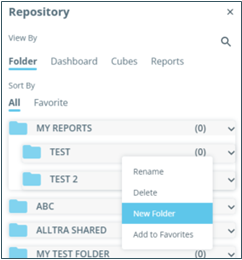
You can also delete a folder by right-clicking on it and select Delete from the context menu.
Favorites
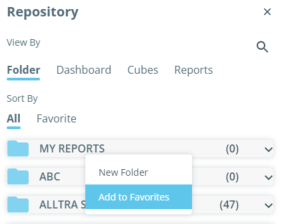
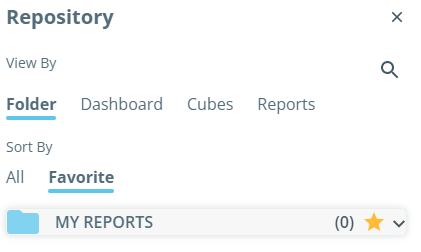
Also within the Repository pop-out, users can tag any folder, dashboard, spend cube or report, as a Favorite. Right-click on a folder or asset and select Add to Favorites. Favorites will have a star icon displayed.
The repository can also be filtered to only show Favorites.